
Steve AI is an AI-powered video generator built for faceless channels and marketing teams, with a pricing structure based on output volume and generative capabilities. Steve AI pricing ranges from $0/month for the free plan (with watermarks and 720p limits) to $29/month for the Starter plan (1080p and logo removal), $59/month for Pro (2K resolution and 300 video minutes), $129/month for the Generative AI plan (100% human-like voices and 15 minutes of generative credits), and custom Enterprise pricing typically meant for large agencies. The detail that really drives Steve AI cost up or down is how heavily you rely on purely generative AI clips rather than stock footage—generative motion burns through a separate credit pool that caps out fast on cheaper plans. Buyers looking into Steve AI alternatives often weigh it against Lumen5 and Pictory, which we compare on price later in this article.
The official pricing page lists minute quotas and asset limits, but it does not make it obvious when you will actually need to buy add-on credits to finish a campaign. Reading the label is one thing, but running out of generative credits halfway through the month is another. This article breaks down exactly what you get for your money, where the quotas start to pinch, and which plan makes the math work for your specific video production schedule.
Key Takeaways
- Cheapest paid plan: Starter at $29/month (or $19/month if billed annually).
- Most common plan: Pro at $59/month strikes the best balance of quotas and resolution for most small teams.
- Annual discount: Paying yearly saves you up to $360/year depending on your plan tier.
- Enterprise option: Custom limits and volume-based discounts are available for large organizations that need 4K resolution and strict security.
- The core cost reality: Steve AI splits its quotas. Standard stock-based videos pull from a large minute pool, but purely generative AI motion clips use a strictly capped “Generative Credit” pool that runs out much faster.
Steve AI Pricing Plans
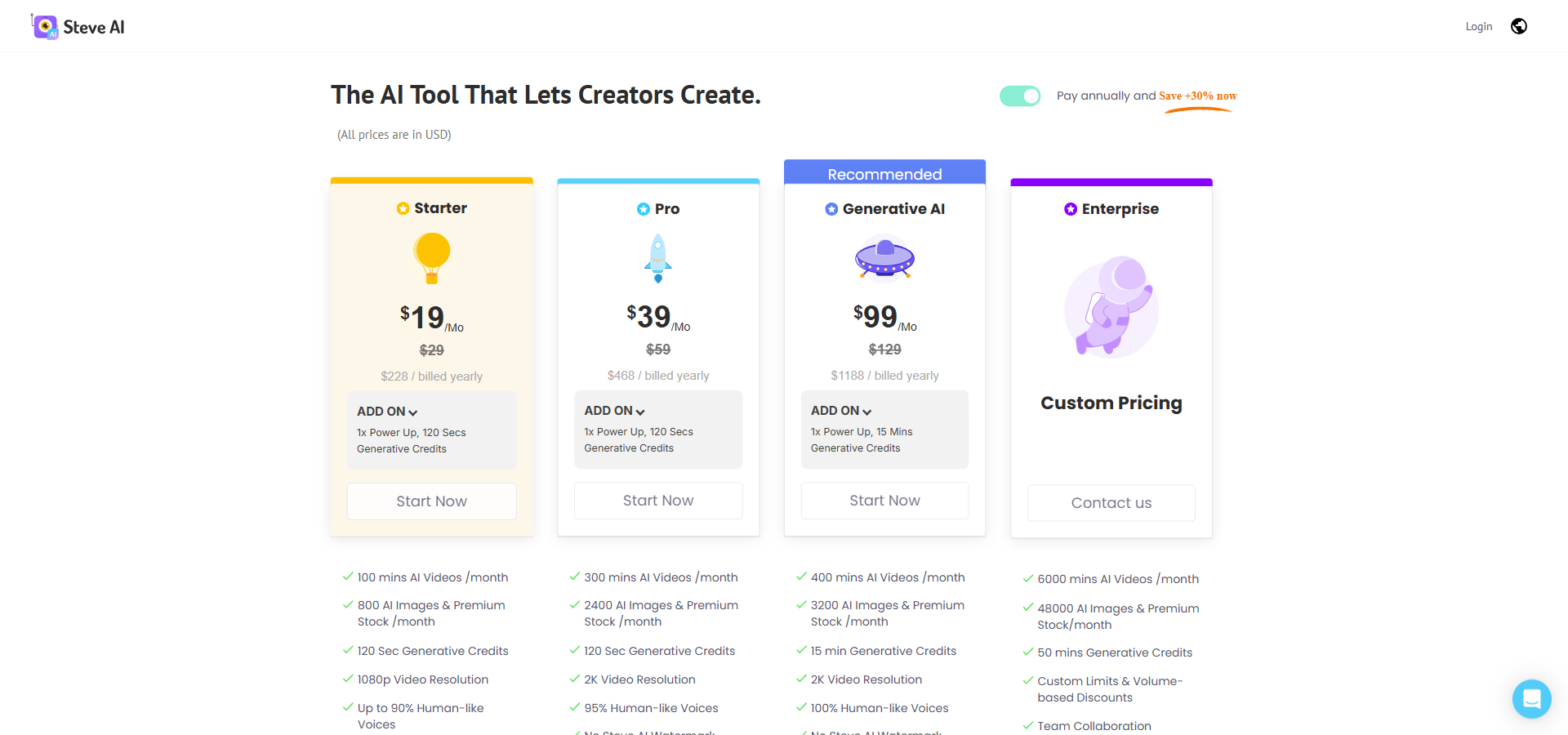
Here is exactly what you get on every Steve AI plan, based on the standard month-to-month billing options.
Starter
Billed Monthly: $29/month
Billed Annually: $19/month (billed annually at $228/year)
Annual Savings: $120
Features included:
- 100 mins AI Videos /month
- 800 AI Images & Premium Stock /month
- 120 Sec Generative Credits
- 1080p Video Resolution
- Up to 90% Humanlike Voices
- No Steve AI Watermark
- Unlimited Video Exports
- 300+ Animated Characters
Limitation: Video quality is capped at 1080p, and you only get 120 seconds of purely generative AI motion credits per month.
Benefits: This is a highly accessible entry point for individual creators who rely mostly on stock footage and 2D animated characters.
Pro
Billed Monthly: $59/month
Billed Annually: $39/month (billed annually at $468/year)
Annual Savings: $240
Features included:
- 300 mins AI Videos /month
- 2400 AI Images & Premium Stock /month
- 120 Sec Generative Credits
- 2K Video Resolution
- 95% Human-like Voices
- No Steve AI Watermark
- Unlimited Video Exports
- 300+ Animated Characters
Limitation: Despite the higher overall video minute quota, generative credits remain locked at 120 seconds.
Benefits: Triples your core video minutes and unlocks 2K resolution, making it ideal for regular YouTube creators and small marketing agencies.
Generative AI
Billed Monthly: $129/month
Billed Annually: $99/month (billed annually at $1,188/year)
Annual Savings: $360
Features included:
- 400 mins AI Videos /month
- 3200 AI Images & Premium Stock /month
- 15 min Generative Credits
- 2K Video Resolution
- 100% Human-like Voices
- No Steve AI Watermark
- Unlimited Video Exports
- 300+ Animated Characters
Limitation: At $129 per month, it is a significant price jump for users who do not actually need massive generative AI workflows.
Benefits: Provides 15 minutes of generative credits and the highest standard of human-like AI voices, built for heavy, original motion-content users.
Enterprise
Billed Monthly: Custom pricing
Billed Annually: Contact sales
Annual Savings: Not available
Features included:
- 6000 mins AI Videos /month
- 48000 AI Images & Premium Stock/month
- 50 mins Generative Credits
- Custom Limits & Volume-based Discounts
- Team Collaboration
- Dedicated Infrastructure
- 4K Video Resolution
- Commercial & Reselling Rights
- No Steve AI Watermark
- AI Data Privacy & Advanced Security
- Customized Onboarding
- Branded Video Templates
- Personalized Avatars
- Custom Integrations
- Brand Media Setup – Fonts, Logos, & Colors
- Multiple Workspaces & Teams
- Org Controls, Security & SSO
Limitation: Geared strictly toward corporate budgets; overkill for solo creators or small business teams.
Benefits: Delivers massive volume quotas, 4K resolution, and enterprise-grade security for large agencies producing video at scale.
Steve AI Feature Comparison Table
This side-by-side breakdown shows exactly how quotas and features scale across Steve AI’s pricing tiers.
| Feature | Starter $29/month | Pro $59/month | Generative AI $129/month | Enterprise Custom pricing |
|---|---|---|---|---|
| PRICING | ||||
| Monthly price (billed annually) | $19/month | $39/month | $99/month | Custom pricing |
| Annual total | $228/year | $468/year | $1,188/year | Contact sales |
| Regular monthly price (month-to-month) | $29/month | $59/month | $129/month | Custom pricing |
| USAGE | ||||
| AI Videos per month | 100 mins AI Videos /month | 300 mins AI Videos /month | 400 mins AI Videos /month | 6000 mins AI Videos /month |
| AI Images & Premium Stock per month | 800 AI Images & Premium Stock /month | 2400 AI Images & Premium Stock /month | 3200 AI Images & Premium Stock /month | 48000 AI Images & Premium Stock /month |
| Generative Credits | 120 Sec Generative Credits | 120 Sec Generative Credits | 15 min Generative Credits | 50 mins Generative Credits |
| Add-On | 1x Power Up, 120 Secs Generative Credits | 1x Power Up, 120 Secs Generative Credits | 1x Power Up, 15 Mins Generative Credits | Custom |
| VIDEO QUALITY | ||||
| Video Resolution | 1080p Video Resolution | 2K Video Resolution | 2K Video Resolution | 4K Video Resolution |
| Voice Quality | Up to 90% Humanlike Voices | 95% Human-like Voices | 100% Human-like Voices | 100% Human-like Voices |
| EXPORTS AND WATERMARK | ||||
| No Steve AI Watermark | ✓ | ✓ | ✓ | ✓ |
| Unlimited Video Exports | ✓ | ✓ | ✓ | ✓ |
| CREATIVE ASSETS | ||||
| 300+ Animated Characters | ✓ | ✓ | ✓ | ✓ |
| ENTERPRISE FEATURES | ||||
| Custom Limits & Volume-based Discounts | ✗ | ✗ | ✗ | ✓ |
| Team Collaboration | ✗ | ✗ | ✗ | ✓ |
| Dedicated Infrastructure | ✗ | ✗ | ✗ | ✓ |
| Commercial & Reselling Rights | ✗ | ✗ | ✗ | ✓ |
| AI Data Privacy & Advanced Security | ✗ | ✗ | ✗ | ✓ |
| Customized Onboarding | ✗ | ✗ | ✗ | ✓ |
| Branded Video Templates | ✗ | ✗ | ✗ | ✓ |
| Personalized Avatars | ✗ | ✗ | ✗ | ✓ |
| Custom Integrations | ✗ | ✗ | ✗ | ✓ |
| Brand Media Setup – Fonts, Logos, & Colors | ✗ | ✗ | ✗ | ✓ |
| Multiple Workspaces & Teams | ✗ | ✗ | ✗ | ✓ |
| Org Controls, Security & SSO | ✗ | ✗ | ✗ | ✓ |
What to Factor Into Your Budget
If you plan to create completely AI-generated visual clips instead of relying on stock footage or 2D animations, you must budget for Generative Credits. Steve AI splits its usage quotas into two different buckets. You get a large pool for standard AI videos (like 100 minutes on Starter) and a much smaller pool for purely generative AI scenes (just 120 seconds on Starter).
For example, if you are on the $59/month Pro plan, you have 300 minutes of standard AI video, but only 120 seconds of generative credits. If you use up those two minutes testing hyper-realistic generative visuals for a short YouTube intro, you will hit a hard stop on that specific feature for the month. You must then buy a “Power Up” add-on to get another 120 seconds, which adds direct cost to your monthly bill.
Treat the standard AI video minutes as your main workhorse. If your content strategy relies on fully AI-generated scenes in every video, you should jump straight to the Generative AI plan for its 15-minute credit pool rather than buying constant Power Ups on a lower tier.
Monthly vs. Annual Billing: Saving Money
Steve AI offers a steep discount if you commit to paying for a full year upfront rather than month-to-month. The math scales significantly as you move up the tiers.
On the Starter plan, paying the regular $29 monthly rate costs you $348 over a year. If you switch to annual billing, the price drops to an effective $19/month, meaning you pay $228 upfront and save $120. For the Pro plan, 12 months at $59 costs $708, but the annual rate is $468, saving you $240. The Generative AI plan drops from $1,548 a year to $1,188, keeping $360 in your pocket.
Pay monthly if you are testing a single campaign. Lock in the annual rate only once you know you will comfortably publish at least four videos every month for the next year.
Steve AI Pricing vs Competitors
It helps to look at how Steve AI’s pricing model stacks up against other players in the AI video space before making a final call.
| Competitor | Starting Price | Pricing Model / Key Difference |
|---|---|---|
| Fliki AI | $28/month | Strong focus on text-to-speech and translating blogs into audio/video. |
| Lumen5 | $29/month | Built specifically for businesses turning existing blog posts into social clips. |
| Synthesia | $29/month | Specializes in highly realistic human avatars for corporate training. |
| Pictory | $29/month | Optimized for extracting highlights and repurposing long webinars into shorts. |
Steve AI uses a quota-based model that heavily separates standard stock video minutes from purely generative AI motion. Its true advantage is wrapping massive stock libraries and animated 2D characters into a single subscription. Competitors like Lumen5 and Pictory generally price their tiers around content repurposing and text summarization, leaving the heavy creative animation to the side. Synthesia charges a premium for high-fidelity human avatars, which is great for formal training but often unnecessary for casual YouTube channels.
Paying for Steve AI buys you creative flexibility if you want to mix live-action stock with 2D animations in the same workflow. If you only need straightforward text-to-video repurposing without the animated characters, a cheaper entry point elsewhere might get the job done just as well.
So, Is Steve AI’s Pricing Worth It? My Take.
The quota system here is generous for standard stock and animation workflows, but tight for generative motion. Steve AI is highly cost-effective for educators, content marketers, and faceless channel creators who need to pump out weekly videos using stock footage and 2D characters. It is less valuable for editors who want granular, frame-by-frame control over complex cinematic projects—this is an automation tool, not a replacement for traditional editing software.
The gap between the Pro plan and the Generative AI plan is steep, so you need to be honest about what kind of visuals you actually need to produce. If stock footage works for your audience, you do not need the expensive tier. If you demand original, prompt-generated motion video, the lower tiers will restrict you too quickly.
Here is the call: if you are an individual creator pushing out simple weekly explainer videos, buy the Pro plan for the 2K resolution and the generous 300-minute standard video quota. If you run a creative agency that relies heavily on original, text-to-video generative clips rather than stock media, pay the premium for the Generative AI plan to avoid hitting credit ceilings.
Quick Decision Checklist
- Do you need 4K resolution? You will need to contact sales for the custom Enterprise plan.
- Are you going to rely on purely generative AI motion clips? You will need the Generative AI plan to get more than 120 seconds of credits per month.
- Do you need 100% human-like voice quality? This requires the Generative AI plan or the Enterprise plan.
- Is 1080p acceptable for your audience? The $29/month Starter plan will be enough to get you going.
Quick Questions You Might Have
Q: Does Steve AI have a free plan?
A: Yes, there is a free tier with 1,200 seconds of AI video, but your outputs are limited to 720p and will carry a Steve AI watermark.
Q: Can I get a refund if I am unhappy?
A: User feedback indicates that Steve AI has a strict refund policy, often denying refunds if the platform has been used to generate content. Test the free plan thoroughly before paying.
Q: What happens if I hit my generative credit limit?
A: You cannot generate more pure AI visuals until your billing cycle resets, unless you purchase a “Power Up” add-on to extend your credits for the month.
Q: Can I upgrade or downgrade my plan?
A: Yes, you can shift plans as your content volume changes, though unused credits do not typically roll over from month to month. Confirm current rollover rules on the official page.
Q: Does the platform offer priority support?
A: Standard chat and email support is available across all paid plans, but customized onboarding and dedicated infrastructure are reserved for Enterprise customers.
Wrapping It Up: Your Steve AI Decision
Steve AI strikes a solid balance between affordability and automation, especially for small teams running faceless channels or educational series. Its real strength lies in separating the heavy lifting of script-to-scene assembly from manual editing, letting you get a draft video out in minutes.
The main detail to keep in mind is the sharp split between standard video minutes and generative credits. Your next step is straightforward: sign up for the free plan, drop a script into the text-to-video engine, and see if the automatic scene assembly matches your creative vision before you pull out a credit card for the Pro plan.