

Lumen5 pricing starts at $29/month on the Basic plan, offering a straightforward way to turn existing blog posts and PDFs into social-ready videos. The biggest hurdle in content marketing is the time it takes to produce video, especially for teams with no video editing skills. Lumen5 attempts to solve this by bringing in an AI Script Composer, an automated AI Video Generator, and enterprise-grade brand kits that do the heavy lifting for you. You get access to over 50 million stock assets without leaving the browser, which speeds up daily work significantly.
The platform competes directly with tools like Synthesia, Fliki AI, and Pictory, but it takes a slightly different approach to visual storytelling by focusing on text and stock media rather than digital avatars. It is built to make video creation as simple as putting together a slide presentation. Can an automated tool actually replace a dedicated video editor for a growing business?
In this Lumen5 review, I will break down the features, exact pricing costs, and the best alternatives on the market. I also ran a hands-on test on the platform to see exactly how it performs when converting a long-form article into a short video clip.
Lumen5 Overview
To give you a quick summary, this section outlines Lumen5’s key attributes, including who it is designed for, its starting price, standout features, and the plan we believe offers the best value.
| Best for | Marketing teams, educators, and enterprise internal communications |
|---|---|
| Starting cost | $29/month (Basic plan) |
| Hero features | AI Script Composer, AI Video Generator, brand kits, and automated aspect ratio conversion |
| ROI sweet-spot plan | Starter Plan at $79/month – unlocks 1080p exports and 50 million stock assets |
| Quick trial / CTA |
Try Lumen5 Free Now |
Lumen5 Pricing & Plan Breakdown
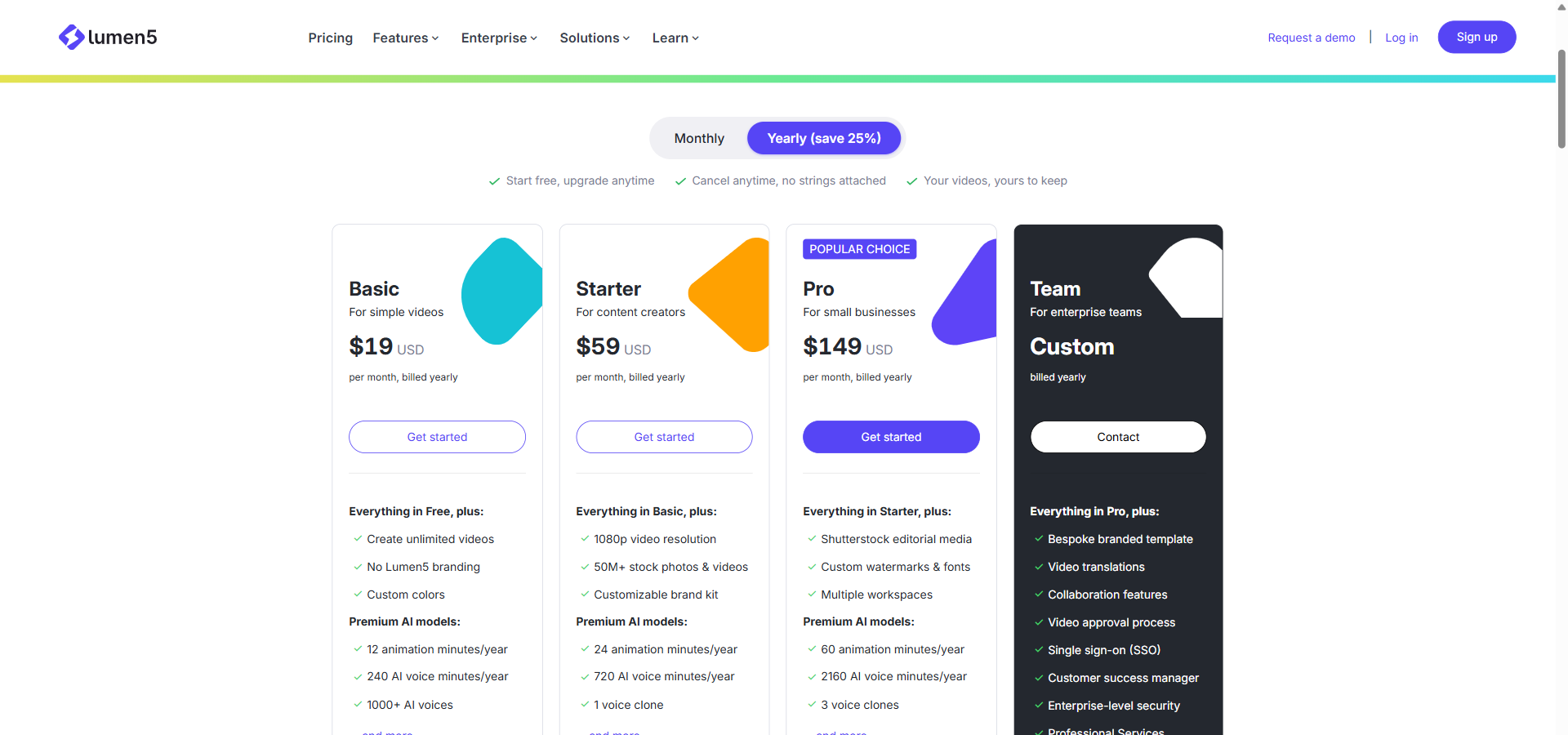
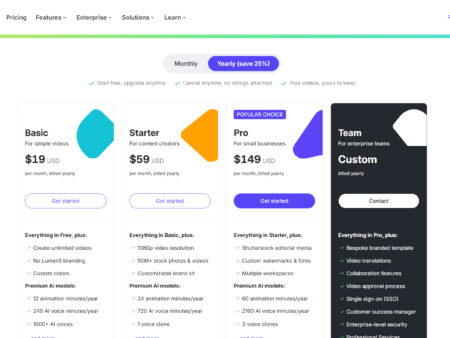
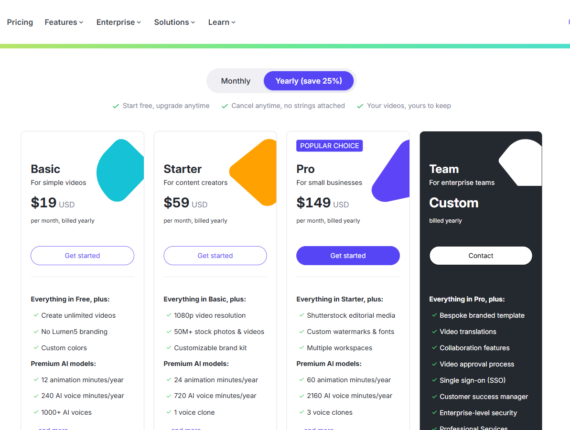
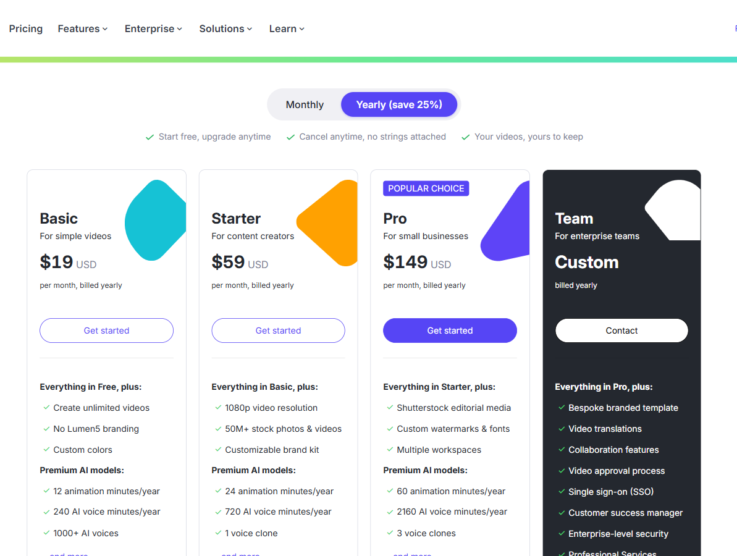
Lumen5 cost options are split across five tiers, giving you the choice to start for free or scale up to a full enterprise package.
Lumen5 pricing starts at $29/month on the Basic plan.
Free
Billed Monthly: $0/month
Billed Annually: $0/month
Annual Savings: $0
Features included:
- Contains Lumen5 branded outro
- Max 2-minute long videos
- 5 videos per month
Basic
Billed Monthly: $29/month
Billed Annually: $19/month (billed annually at $228)
Annual Savings: $120
Features included:
- Create unlimited videos
- No Lumen5 branding
- Custom colors
- Premium AI models (1000+ AI voices and more)
- 1 animation minute/month (monthly) / 12 animation minutes/year (yearly)
- 20 AI voice minutes/month (monthly) / 240 AI voice minutes/year (yearly)
Starter
Billed Monthly: $79/month
Billed Annually: $59/month (billed annually at $708)
Annual Savings: $240
Features included:
- 1080p video resolution
- 50M+ stock photos & videos
- Customizable brand kit
- Premium AI models (1 voice clone and more)
- 2 animation minutes/month (monthly) / 24 animation minutes/year (yearly)
- 60 AI voice minutes/month (monthly) / 720 AI voice minutes/year (yearly)
Pro
Billed Monthly: $199/month
Billed Annually: $149/month (billed annually at $1,788)
Annual Savings: $600
Features included:
- Shutterstock editorial media
- Custom watermarks & fonts
- Multiple workspaces
- Premium AI models (3 voice clones and more)
- 5 animation minutes/month (monthly) / 60 animation minutes/year (yearly)
- 180 AI voice minutes/month (monthly) / 2,160 AI voice minutes/year (yearly)
Team
Billed Monthly: Custom pricing
Billed Annually: Custom pricing (billed yearly)
Annual Savings: Custom
Features included:
- Bespoke branded template
- Video translations
- Collaboration features
- Video approval process
- Single sign-on (SSO)
- Customer success manager
- Enterprise-level security
- Professional Services
- Invoiced billing
- Custom AI model usage
The pricing structure rewards users who commit for a full year. The annual billing option offers substantial discounts, saving you $120 on the Basic plan and $240 on the Starter plan. If you only need occasional videos and do not mind standard 720p quality, the Basic plan handles the essentials well without breaking the bank.
However, the $79/month Starter plan hits the sweet spot for serious creators and agencies. It unlocks crisp 1080p resolution and access to 50 million stock assets, which greatly improves the final look of your content. Upgrading to the Pro tier makes sense mostly if you manage multiple brands across different workspaces and require high-end editorial stock media.
If you want more details on pricing plans or alternative options, see the internal pricing review for a deeper dive. Ultimately, the hours saved on manual video editing easily justify the Lumen5 pricing for active marketing teams. You can start with the free version to see how the system handles your text before paying for a subscription.
Core Lumen5 Features Explained
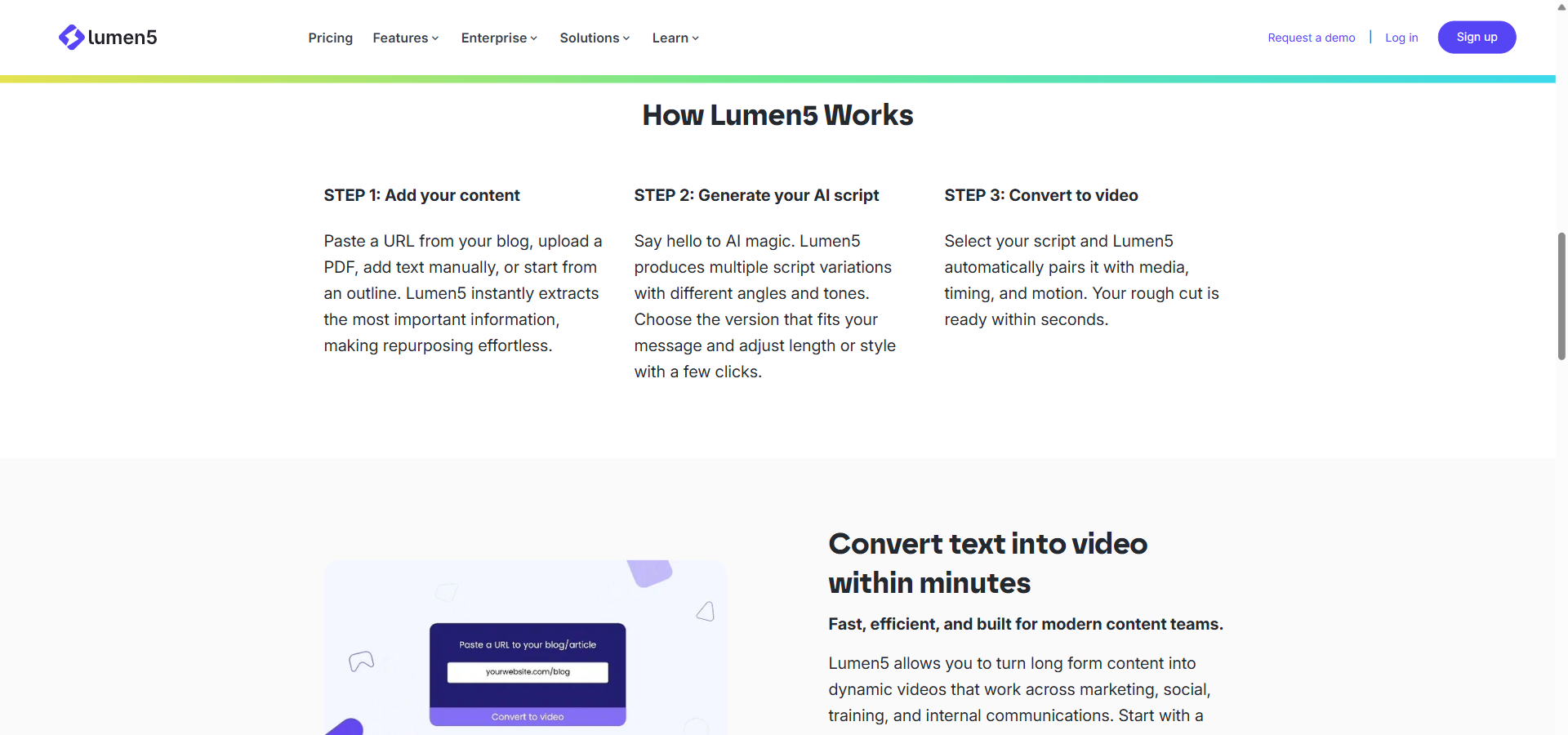
The Lumen5 features list focuses heavily on making video creation accessible through text-to-video automation and enterprise brand controls.
Lumen5’s strongest features are its AI Script Composer and automated brand kits, which remove the need for manual video design work.
AI Script Composer
AI Script Composer is a content extraction tool that reads uploaded text, PDFs, or URLs and automatically generates a shortened video script. This helps you skip the blank page phase and move directly to reviewing a drafted narrative. It analyses the text to find key messages and provides different angles, such as a quick summary or a detailed explanation. Marketing teams benefit the most here, as it allows them to turn long reports into daily social media posts effortlessly.
AI Video Generator
The AI Video Generator is an automated engine that breaks a script into individual scenes, adds relevant stock media, and applies background music. Instead of editing on a complex timeline, you manage the video like a simple slide deck. It calculates scene lengths based on the text pacing, ensuring viewers always have enough time to read the captions. While the initial draft is impressive, you might still need to swap out the occasional generic image for a better visual fit.
Brand Kits and Guardrails
Brand kits are customisation profiles that automatically apply your company’s specific colours, fonts, and logos to every generated video scene. You set these design rules once, and the software ensures every video sticks to the approved style. The Starter plan provides one brand kit, while the Pro tier allows up to three for managing different company identities. This feature is particularly useful for agencies and human resources teams that must keep all communications looking uniform.
AI Voiceover and Voice Cloning
AI Voiceover is an audio feature that reads your script aloud using over 40 natural-sounding voices, eliminating the need to record human narration. You can simply assign a voice to a scene, and the tool will match the timing perfectly without manual syncing. On the Basic plan and above, you also get access to voice cloning, letting you create a digital replica of your own voice for future projects. This is highly practical for course creators or executives who want to narrate videos without stepping into a sound booth.
Overall, these features work together smoothly to simplify the video production process. The platform is intentionally built to prevent users from getting stuck in deep editing menus. The trade-off is that you surrender some fine-grained control over individual video frames, but you gain a massive increase in output speed.
Pros & Cons of Lumen5
Every software tool has trade-offs, so it helps to weigh the pros and cons of Lumen5 before committing to a paid plan.
The main advantage of Lumen5 is its speed and ease of use, while its biggest drawback is the relatively steep cost of its mid-tier plans.
Here is a quick breakdown of what works well in Lumen5 and where it falls short.
| ✔️ Pros | ❌ Cons |
|---|---|
| ✔️ Very easy to use with a slide-based editing interface | ❌ The $79/month Starter plan can feel expensive for solo users |
| ✔️ Automatically converts blog post URLs into draft videos | ❌ AI sometimes selects generic or mismatched stock images |
| ✔️ Excellent brand kits ensure consistent company colours | ❌ Lacks advanced multi-track timeline editing features |
| ✔️ Built-in AI voiceovers save time on audio recording | ❌ The free plan limits videos to 720p and includes watermarks |
| ✔️ Reformatting videos for different social media ratios is fast | ❌ Heavy projects can sometimes experience slow rendering times |
In my experience, the sheer volume of time you save on manual video editing easily justifies the cost if you publish content regularly. However, solo creators might find the Starter plan a bit heavy for occasional use and may need to manually correct the AI’s image choices.
Lumen5 vs Alternatives
If you are unsure about the platform, comparing Lumen5 to its best alternatives can help you decide which tool fits your workflow.
Fliki AI, Synthesia, and Pictory offer different approaches to AI video, ranging from avatar-focused presentations to cheaper social clips.
Fliki AI
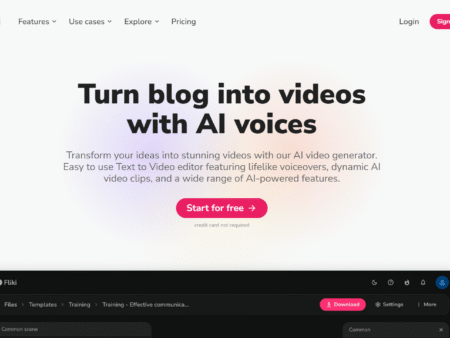
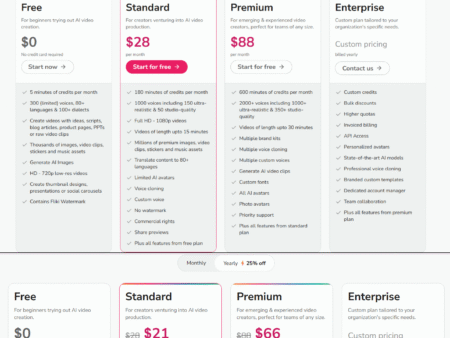
Fliki AI starts at $28/month and focuses heavily on providing a massive library of voices and automation tools for faceless YouTube channels. The key difference here is that Fliki leans deeply into audio and bulk creation, while Lumen5 has stronger enterprise brand governance and a more intuitive slide-style editor. Fliki is a better choice if your main goal is scheduling high-volume social media series.
Synthesia
Synthesia has a free Basic plan, and its paid plans start at $19 per month on Starter (or $14 per month billed yearly). It excels at generating realistic AI avatars that lip-sync to your script. While Lumen5 relies on stock footage and text overlays to tell a story, Synthesia gives you a digital human presenter. Synthesia is highly recommended for internal corporate training and educational courses, whereas Lumen5 is better suited for fast-paced content marketing.
Pictory
Pictory starts at $29 per month on its Starter plan (or $25 per month billed yearly), the same entry price as Lumen5’s Basic plan. Unlike Lumen5, it has no free plan, only a 14-day free trial. Both tools automatically turn text into videos using stock media, but Pictory focuses heavily on extracting short highlight reels from long webinars and Zoom calls. Lumen5 stands out over Pictory when it comes to managing multiple brand kits and team collaboration, making it the stronger choice for larger organisations.
Who Should Use Lumen5?
The software fits certain workflows perfectly, but it is not the right choice for every type of video creator.
Lumen5 is best suited for content marketers, HR departments, and agencies that already have written material ready to convert into video.
- Content Marketing Teams: Marketers can paste a blog post URL into the tool and receive a ready-to-publish social clip in minutes. The Starter plan provides 50 million stock assets, ensuring daily videos remain fresh.
- Internal Communications & HR: Human resources staff can transform dry company memos and policy updates into engaging video announcements. Brand kits guarantee that the video always matches the corporate identity.
- Educators and Course Creators: Teachers can upload PDF manuals or slide text, and the software will build structured explainer modules. The AI voiceover handles the narration, removing the need to record audio for every lesson.
- Digital Agencies: Agencies managing several clients can use the Pro plan, which provides three distinct workspaces. This keeps client assets separate and ensures you never accidentally use the wrong logo.
If you are a professional video editor looking for fine-tuned keyframe animation and colour grading, Lumen5 will feel too restrictive. It is built for speed and simplicity, not for Hollywood-style post-production.
Hands-On Test: Here is How I Converted a Blog Post into a Video with Lumen5
I walked step-by-step through Lumen5’s text-to-video workflow — importing a published blog URL, adjusting the script, and applying brand settings — noting where it excels at speed and pointing out a few quirks in the AI image selection.
I started by pasting a 1,000-word blog post URL directly into the content ingestion tool. Within seconds, the AI Script Composer scraped the text and presented multiple script variations. I selected a short, 60-second summary angle. This automatic extraction is a massive time-saver compared to manually typing out a script paragraph by paragraph.
Next, the AI Video Generator broke the script into distinct scenes and paired them with stock media. The software handles layout and pacing independently, formatting the text nicely across each slide. It generated a complete draft video in under two minutes, which is an excellent result for a cloud-based platform operating entirely in the browser.
However, there were a few minor quirks during the process. The AI selected generic stock footage for a highly technical paragraph, meaning I had to manually search the media library for a more relevant clip. Despite this small snag, swapping out the video was as easy as dragging and dropping a new file directly onto the slide.
To finish up, I applied a custom brand kit to set the colours and added an AI voiceover. The system correctly synced the narration to the scene lengths without requiring any manual timeline adjustments on my part. Ultimately, the entire process took about ten minutes to produce a polished, ready-to-publish social media video.
⭐ Our Expert Ratings for Lumen5
Lumen5 is a capable AI video platform for converting written content into branded videos with minimal editing expertise. It performs best for marketers, communications teams, educators, and enterprises that prioritize speed, content repurposing, and brand governance over frame-by-frame creative control.
Features and Functionality
Our evaluation found a broad, well-integrated feature set centered on Lumen5’s AI Script Composer, AI Video Generator, browser editor, stock media, captions, voiceover, voice cloning, animation, aspect-ratio conversion, brand kits, and content ingestion from URLs, PDFs, transcripts, and pasted text. Higher plans add multiple workspaces, custom fonts and watermarks, translations, approval workflows, SSO, audit logs, DAM integrations, API access, and enterprise support.
The main limitation is depth rather than breadth. Lumen5 is highly effective for text-to-video and content repurposing, but it does not provide the granular multi-track editing, keyframe control, and advanced audio editing available in professional production software. AI-selected visuals can also require manual correction when they do not precisely match the intended message.
External user feedback broadly supports this assessment. [G2 user reviews](https://www.g2.com/products/lumen5/reviews) emphasize professional-looking results, rapid blog-to-video creation, and the usefulness of the media library, while also noting occasional visual mismatches and limitations in customization. The result is a strong feature score for business content production, though not for advanced video post-production.
Ease of Use
Our testing and analysis indicate that Lumen5 has one of its clearest advantages in usability. The slide-like scene editor is less intimidating than a traditional timeline, and the automated workflow can transform source text into a draft containing scenes, captions, media, transitions, and narration. Users can then refine scripts, replace visuals, modify layouts, and apply brand settings without needing conventional video-editing experience.
The workflow is particularly efficient for repetitive production. A user can import a blog post or document, choose from generated script variations, select an output format, and make targeted adjustments rather than building a video from scratch. The main usability drawbacks are occasional interface friction, limited audio granularity, and the need to review AI-generated content carefully.
This aligns with the strong usability findings in [Capterra ratings and verified reviews](https://www.capterra.com/p/167719/Lumen5/reviews/), where Lumen5 is rated 4.6/5 for ease of use. Reviewers commonly describe the platform as intuitive and suitable for users without prior editing experience. Its automation and presentation-style interface justify a near-top score.
Pricing and Value for Money
Our value assessment finds a sensible tier structure, but the higher plans can be expensive for individual creators and small businesses.
- Free: $0/month, with five videos per month, a two-minute maximum length, 720p output, and Lumen5 branding.
- Basic: $29/month, or $19/month when billed annually; includes unlimited unbranded videos, 720p output, premium AI models, one brand kit, and limited AI voice and animation minutes.
- Starter: $79/month, or $59/month annually; adds 1080p output, 50M+ stock photos and videos, a customizable brand kit, one voice clone, and larger AI allowances.
- Pro: $199/month, or $149/month annually; adds Shutterstock editorial media, three workspaces, custom fonts and watermarks, three voice clones, and higher usage limits.
- Team: Custom annual pricing; adds multi-user collaboration, unlimited workspaces, translations, approval workflows, SSO, enterprise security, DAM integrations, professional services, and invoiced billing.
Basic offers reasonable value for solo marketers who need unlimited, unbranded output. Starter is likely the strongest balance for creators and small marketing teams that require HD video and broader media access. Pro is more defensible for agencies or multi-brand operations, while Team’s value depends on whether an organization needs governance, security, collaboration, and implementation support.
The weakness is that Starter and Pro can appear costly compared with general-purpose tools, especially when users need only occasional videos or extensive manual customization. External reviews reflect this concern: Capterra reports a 4.4/5 value-for-money rating, below its overall 4.6/5 score, and user commentary frequently identifies higher-tier pricing as a drawback. Lumen5 earns a solid but not exceptional value score because its productivity gains can justify the cost for business users, while budget-conscious creators may find cheaper alternatives more attractive.
Performance and Reliability
Our analysis suggests that Lumen5 is reliable as a cloud-based production environment and benefits from a straightforward browser workflow that avoids specialized desktop hardware. Its automated generation, reusable brand settings, integrations, and API capabilities support repeatable production at scale.
However, performance is not consistently frictionless. User feedback identifies occasional lag, slow rendering, and sticky production behavior, particularly on larger or more complex projects. AI-generated drafts also require editorial review, so the platform should not be treated as a completely hands-off production system. Reliability is therefore adequate for routine marketing and communications work, but less predictable when deadlines are tight or projects contain heavier media and animation demands.
The external review evidence is mixed but generally positive. Capterra’s overall 4.6/5 rating indicates strong user satisfaction, while individual reviews mention glitches and rendering delays. These concerns prevent a higher score, although they do not outweigh the platform’s broader usefulness for standard content-repurposing workflows.
| Category | Score (out of 10) |
|---|---|
| Features & Functionality | 8.6 |
| Ease of Use | 9 |
| Pricing & Value | 7.2 |
| Performance & Reliability | 7.4 |
| Overall average score: 8.1 out of 10 | 8.1 |
Lumen5 is best suited to organizations that need to turn existing written content into frequent, consistent, brand-aligned videos. Its strongest advantages are automation, accessibility, and enterprise brand controls; its main trade-offs are higher-tier pricing, imperfect AI media selection, and occasional rendering or performance issues.
Final Verdict: Is Lumen5 Worth It?
Wrapping up the details gives a clear picture of whether this software deserves a spot in your marketing budget.
Yes, Lumen5 is worth it for marketing teams and agencies that need to produce brand-consistent videos at scale without hiring an editor. If you frequently write blog posts, manuals, or industry reports, the platform pays for itself by instantly converting those words into watchable social media content. The automated brand kits ensure your company always looks professional.
However, solo users or hobbyists might find the $79/month Starter plan too expensive for occasional output. If you are on a strict budget, exploring cheaper alternatives might serve you better. But for businesses where time equals money, Lumen5 removes the production bottleneck completely.
Frequently Asked Questions About Lumen5
These are the most common questions buyers ask when researching the platform and preparing to sign up.
Is Lumen5 free?
Yes, Lumen5 has a permanent free plan available for casual video enthusiasts. It permits you to create up to 5 videos per month, capped at a two-minute length. However, exports are limited to 720p resolution and include a Lumen5 watermark on the final output.
How much does Lumen5 cost per month?
Lumen5 pricing starts at $29/month on the Basic plan for unlimited video creation. The Starter plan costs $79/month and adds 1080p resolution, while the Pro plan costs $199/month. You can secure significant discounts by paying annually instead of monthly.
Does Lumen5 have a free trial?
Yes, the permanent free plan effectively functions as a free trial with no time limit. It gives you access to the editor, templates, and stock media library so you can test the text-to-video workflow. You only need to upgrade when you want to remove the watermark or access premium AI voices.
What is Lumen5 used for?
Lumen5 is used to transform text-based content—such as blog posts, whitepapers, and PDF manuals—into engaging videos. It uses AI to draft a script, split the text into slides, and apply relevant stock footage. Marketers and HR teams primarily use it to create social clips, explainers, and internal announcements.
Lumen5 vs Fliki AI — which is better?
Fliki AI is better for creators looking to automate high-volume faceless YouTube channels with an extensive library of voices. Lumen5 is better for corporate marketing teams that require strict brand governance, multiple workspaces, and a more intuitive slide-style editing interface.
It is definitely worth creating a free account to test out the video generator yourself before making a final decision.