


What Is Lumen5?
Lumen5 is an AI video generation tool that turns text and existing documents into professional visual content — built for corporate marketing and internal communications teams. It removes the need for complex editing software by using a slide-based approach to video assembly, allowing anyone to produce content quickly.
The platform stands out for its AI Script Composer, automated scene assembly, and built-in library of stock media. Paid options start at $29/month on the Basic plan, which gives users unlimited 720p video exports and access to premium digital voices.
While tools like Fliki AI focus heavily on high-volume automated channels, Lumen5 prioritises strict brand governance and content repurposing. Here is a complete breakdown of the software and its capabilities, updated for 2026.
Lumen5 Overview
This quick snapshot details Lumen5’s ideal user base, starting costs, standout features, and the most cost-effective plan for businesses.
| 👤 Best for | Marketing teams, corporate communications, and instructional designers |
|---|---|
| 💵 Starting cost | $29/month (Basic plan) |
| ⚡ Hero features | AI Script Composer, automated scene assembly, brand kits, text-to-video ingestion, premium AI voices |
| 📈 ROI sweet-spot plan | Starter Plan at $79/month – unlocks 1080p resolution and extensive stock media |
| 🧪 Free plan or trial | Free plan available • 5 videos per month included |
| 🎯 Use cases | Content repurposing, social media teasers, internal training videos, product updates |
| 🚀 Quick trial / CTA | Try Lumen5 Free Now |
Lumen5 Pros & Cons
Lumen5 speeds up standard video production, but its slide-based editor is not for everyone. Review the key advantages and drawbacks to see if it matches your workflow.
Pros & Cons of Lumen5
See what users appreciate and what to watch out for when using Lumen5.
| ✔️ Pros | ❌ Cons |
|---|---|
| ✔️ Turns URLs and text into video drafts in minutes | ❌ $79/month Starter plan is expensive for individuals |
| ✔️ Slide-style editor is highly intuitive for beginners | ❌ AI image selection can sometimes miss the core message |
| ✔️ Basic plan includes unlimited 720p video exports | ❌ Lacks a multi-track timeline for precise frame editing |
| ✔️ Enterprise governance tools ensure strict brand consistency | ❌ Custom fonts require the $199/month Pro plan |
| ✔️ Connects directly with Zapier for automated generation | ❌ Large projects can experience lag during rendering |
Lumen5 removes the technical barriers to video creation for business teams, letting you produce content quickly. However, advanced creators may find its slide-based editor and high mid-tier pricing slightly restrictive.
Lumen5 Pricing Plans
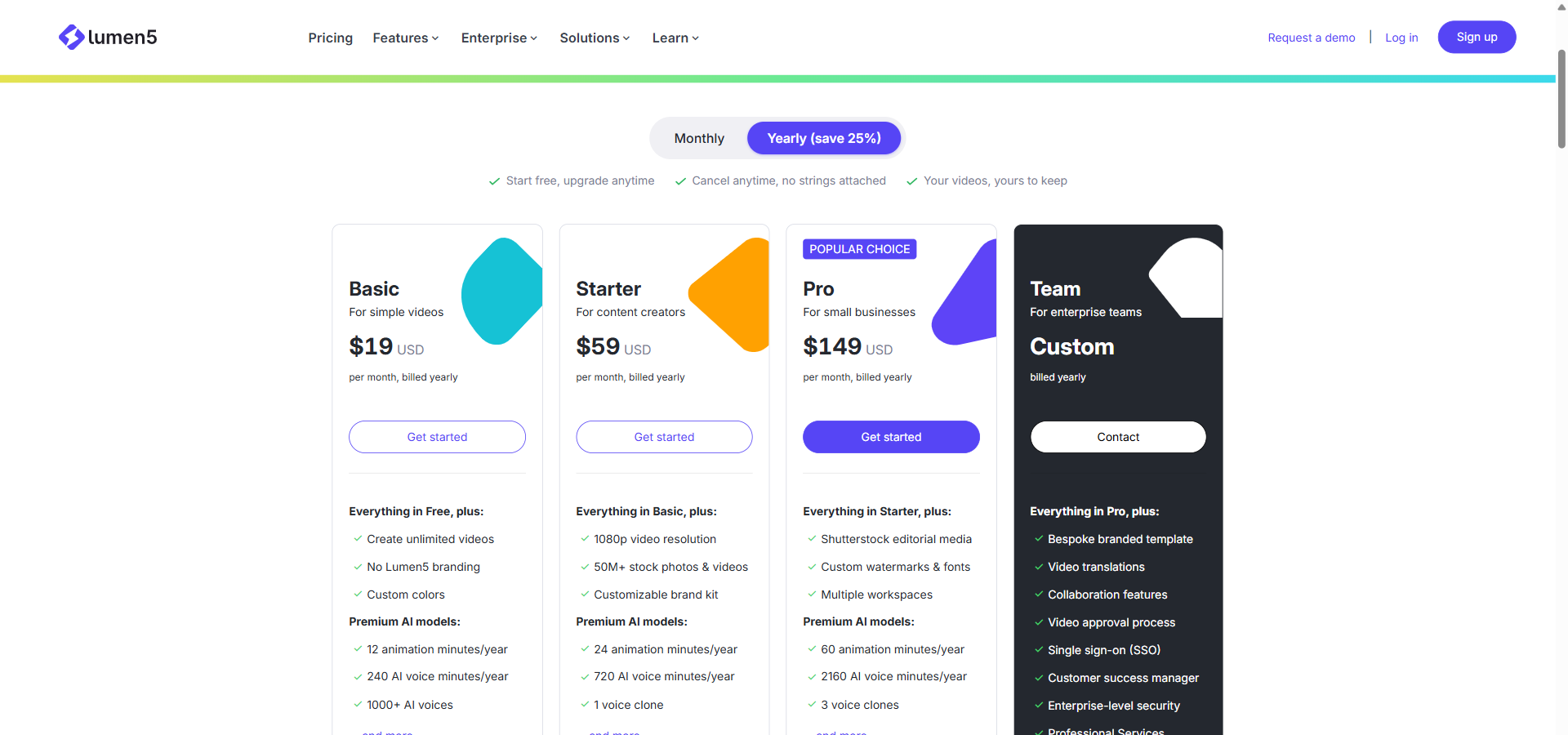
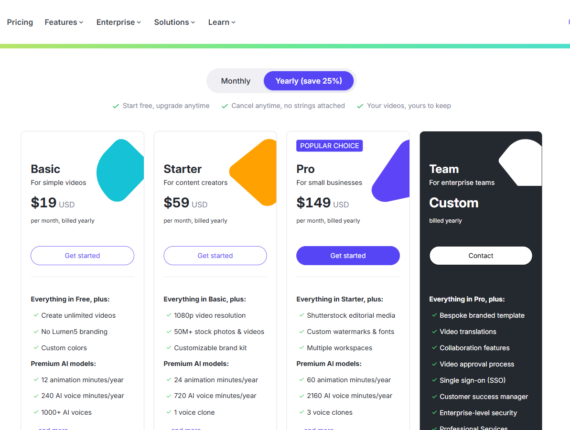
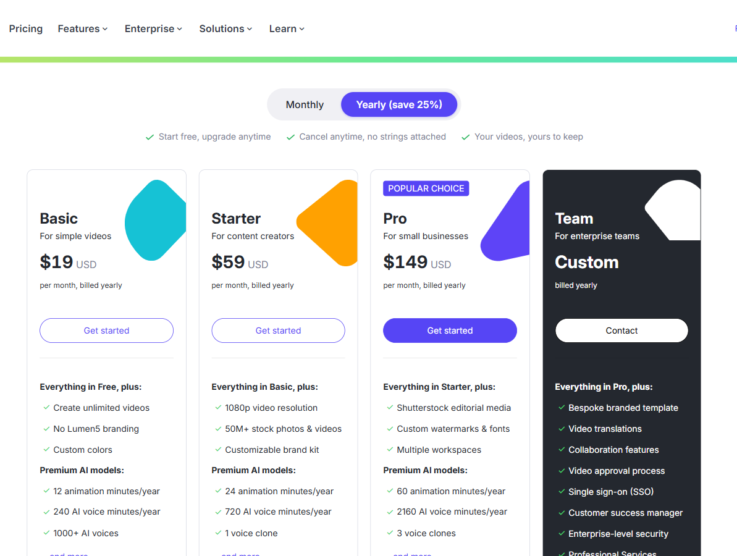
Lumen5 offers five tiers that range from a basic free option to full enterprise deployments. The pricing structure is heavily dependent on video resolution, AI voice minutes, and brand control features.
Free
Billed Monthly: $0/month
Billed Annually: $0/month
Annual Savings: $0
Features included:
- Allows up to 5 video exports per month for casual users.
- Restricts maximum video length to 2 minutes per export.
- Limits output resolution to 720p standard high definition.
- Places a Lumen5 branded outro at the end of every video.
- Provides 2 minutes of AI voiceover generation per month.
Basic
Billed Monthly: $29/month
Billed Annually: $19/month (billed annually at $228)
Annual Savings: $120
Features included:
- Removes Lumen5 branding from all completed videos.
- Allows unlimited video creation and exports at 720p resolution.
- Increases the maximum video length to 10 minutes per export.
- Includes 20 AI voiceover minutes and 1 animation minute per month.
- Grants access to 1,000+ premium AI voices and 1 voice clone.
Starter
Billed Monthly: $79/month
Billed Annually: $59/month (billed annually at $708)
Annual Savings: $240
Features included:
- Upgrades all video exports to full 1080p high definition.
- Unlocks a library of over 50 million stock photos and videos.
- Provides a customisable brand kit to lock in corporate colours.
- Includes 60 AI voiceover minutes and 2 animation minutes per month.
Pro
Billed Monthly: $199/month
Billed Annually: $149/month (billed annually at $1,788)
Annual Savings: $600
Features included:
- Allows users to upload their own custom fonts and watermarks.
- Provides access to Shutterstock editorial media (up to 25 items per month).
- Supports up to 3 separate workspaces for multi-brand management.
- Includes 180 AI voiceover minutes and 5 animation minutes per month.
- Unlocks up to 3 separate voice clones for consistent brand narration.
Team
Billed Monthly: Custom pricing
Billed Annually: Custom pricing (billed yearly)
Annual Savings: Custom pricing
Features included:
- Adds multi-user support and unlimited workspaces for large departments.
- Includes video approval workflows to ensure management sign-off.
- Provides unlimited video translations for global marketing reach.
- Integrates single sign-on (SSO) and advanced enterprise-level security.
- Connects directly to digital asset management (DAM) systems for media sharing.
When reviewing Lumen5 pricing, the Basic plan at $29/month is the most cost-effective starting point for general social media videos. However, if your business requires full 1080p resolution and access to millions of premium stock assets, you will need to budget for the $79/month Starter subscription.
Lumen5 Key Features
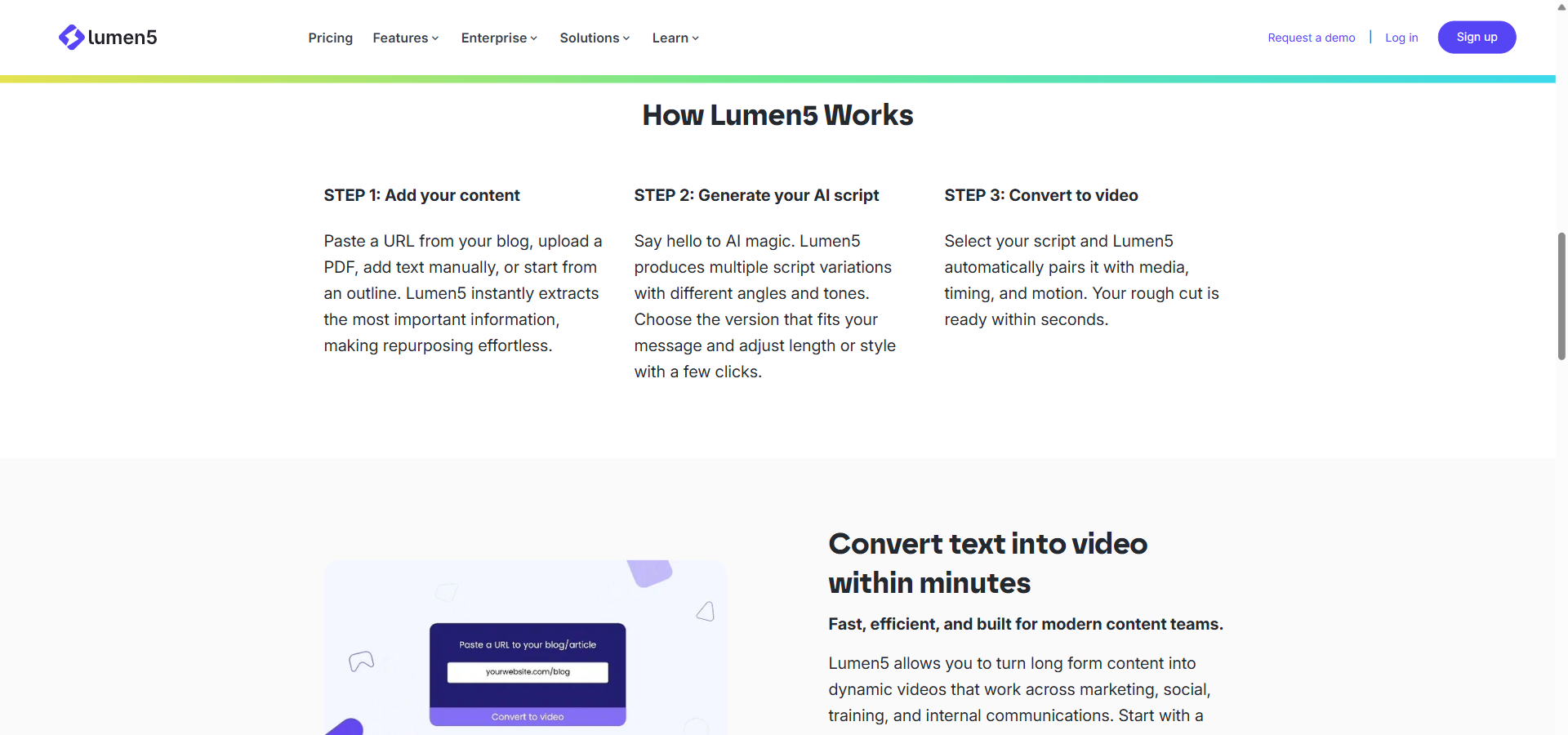
Lumen5 is built around automation and ease of use rather than manual video editing. The platform’s core tools focus on reading your existing content and turning it into a visual format automatically.
- Content Ingestion is a tool that allows users to paste a URL or upload a PDF to extract text automatically. This prevents teams from having to type out long scripts manually when repurposing blogs or whitepapers.
- AI Script Composer is a text analysis engine that generates multiple script variations from your uploaded documents. It gives you options for different tones and lengths, ensuring the video matches your campaign goals.
- AI Video Generator is an automated assembly system that matches your script with relevant background footage and transitions. It creates a complete draft video instantly, leaving you to only make minor adjustments.
- Browser-Based Editor is a slide-style video modification interface that lets you change text and swap visuals without timeline software. It keeps the editing process simple and accessible for non-technical staff.
- Brand Kits is a set of governance controls that automatically applies your corporate colours, fonts, and logos to every video. It ensures strict visual consistency across all content produced by your team.
- Aspect Ratio Conversion is a formatting tool that resizes your video for different platforms like YouTube or TikTok in a few clicks. It automatically adjusts text placement so nothing gets cut off on mobile screens.
- Licensed Stock Library is a built-in media collection that provides millions of photos and video clips for your backgrounds. It saves you from having to purchase external stock footage subscriptions.
- Talking Head Overlays is a video picture-in-picture feature that lets you place footage of a human presenter over your slides. This is highly useful for corporate training where a personal touch is necessary.
- AI Voiceover is an automated audio tool that reads your script aloud using more than 40 natural-sounding digital voices. It completely removes the need to hire voice actors or set up recording equipment.
- Voice Cloning is an advanced audio tool that creates a digital replica of a specific person’s voice for consistent narration. This is available on the Basic plan and higher for maintaining a single brand spokesperson.
- Animation Engine is a motion graphics system that automatically animates text and images without requiring manual keyframing. It keeps your explainer videos engaging without needing a dedicated motion designer.
- Video Translation is a localisation feature that converts your text and voiceovers into different languages automatically. Global teams use this to repurpose training material for international offices.
- Workspace Management is an organisational tool that separates video projects by department or brand under one company account. It is available on the Pro plan to help agencies manage multiple clients easily.
- Video Approval Workflows is a team collaboration feature that requires management sign-off before a video can be published. It ensures compliance and quality control for enterprise users on the Team plan.
- Zapier Integration is an automation connection that triggers automatic video creation when you update other apps like your CMS. It turns Lumen5 into a hands-free production engine for busy publishing teams.
Top 5 Alternatives to Lumen5
If Lumen5 does not match your budget or your video style, several other platforms offer automated generation. Here is how it compares to other notable options on the market.
-
Fliki AI
Starting price: $28/month. Free plan available.
Fliki AI acts as an all-in-one suite for rapid text-to-video and text-to-speech generation, heavily focused on automated social media scheduling. It includes a massive library of over 2,000 voices and tools specifically designed for running faceless YouTube channels.
Pick Fliki AI over Lumen5 if you want to build and schedule high-volume faceless channels automatically. -
Synthesia
Starting price: Not available. Free plan: Not available.
Synthesia builds videos using highly realistic digital human avatars that read your scripts aloud in multiple languages. It is widely regarded as the standard for corporate learning and development videos where a presenter is required.
Pick Synthesia over Lumen5 if you need realistic digital human presenters for structured training courses. -
Pictory
Starting price: Not available. Free plan: Not available.
Pictory excels at pulling out key highlights from long-form video recordings, such as Zoom webinars or podcasts. It uses AI to summarise spoken transcripts and automatically cuts them into short social media clips.
Pick Pictory over Lumen5 if your primary goal is trimming long video recordings into short social snippets. -
InVideo AI
Starting price: Not available. Free plan: Not available.
InVideo AI relies heavily on pre-made templates and text-prompt generation for fast social media marketing clips. It offers a slightly more flexible editing interface for users who want to tweak standard layouts.
Pick InVideo AI over Lumen5 if you prefer working from a massive library of pre-designed marketing templates. -
Descript
Starting price: Not available. Free plan: Not available.
Descript is an audio and video editor that lets you edit media by modifying the text transcript, much like a text document. It is specifically tailored for podcasters and creators who need detailed control over spoken dialogue and filler words.
Pick Descript over Lumen5 if you need precise control over podcast editing and removing filler words from audio.
Lumen5 holds its ground well against the competition specifically in corporate environments. While tools like Fliki AI are better suited to high-volume solo creators, Lumen5’s brand governance and enterprise integrations make it the superior choice for mid-market and large companies managing multiple departments.
Lumen5 Use Cases
Marketing teams use Lumen5 to turn lengthy whitepapers and blog posts into digestible 60-second social media teasers. Human resources and internal communications departments rely on the tool to convert policy documents and all-hands memos into engaging employee updates. Instructional designers also use the platform to transform dry training manuals and slide decks into narrated video modules that can be easily translated for international staff.
My Verdict on Lumen5
Lumen5 earns its recurring subscription cost — but only if you actively repurpose written content. If your organisation turns existing blogs or manuals into social videos on a weekly basis, the $29/month Basic plan will save you hours of manual editing immediately. The platform’s automated scene assembly handles the heavy lifting, allowing non-technical staff to produce professional results.
If you need to run highly automated, faceless YouTube channels with hundreds of monthly outputs, Fliki AI is a more cost-effective route. However, Lumen5 is the right choice for businesses that want reliable, brand-safe video generation without hiring a dedicated editor.
FAQ about Lumen5
Is Lumen5 free?
Yes, Lumen5 offers a permanent free plan limited to five 2-minute videos per month. However, this free tier includes a Lumen5 watermark on all exports and restricts you to 720p resolution.
How much does Lumen5 cost per month?
Lumen5 costs $29 per month for the Basic plan when billed monthly. You can drop this cost to $19 per month by paying for a full year upfront, which totals $228 annually.
Does Lumen5 have a free trial?
No, Lumen5 does not offer a time-limited free trial, but provides a free-forever tier instead. You can use this free version to test the slide-based editor and AI scripting tools indefinitely before upgrading.
Is Lumen5 worth it?
Yes, Lumen5 is worth it if your team regularly turns written documents into branded video content. The time saved by not having to manually source stock footage or record voiceovers easily covers the $29 monthly fee.
What is Lumen5 used for?
Lumen5 is used for repurposing text-based content like blog posts and training manuals into short videos. It automatically matches your text with stock footage, adds captions, and applies AI voiceovers for quick publishing.
Lumen5 vs Fliki AI — which is better?
Pick Lumen5 over Fliki AI if you need strict corporate brand control rather than high-volume YouTube channel automation. Fliki AI is better for solo creators who want to schedule completely automated series, while Lumen5 provides better governance for business teams.