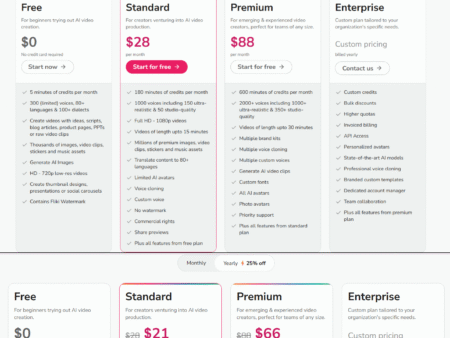

The rapid evolution of the AI video generator has fundamentally transformed how businesses and creators produce high-quality media. However, as the underlying technology behind AI video software becomes more sophisticated, navigating video maker pricing has become increasingly complex. In 2026, buyers are no longer just paying a flat monthly subscription for unlimited access; instead, the industry has universally adopted nuanced, dual-layer pricing models.
To make an informed decision, users must understand the critical difference between consumption-based “credits” (often tied to compute-heavy tasks like rendering minutes) and feature-based gating (which unlocks advanced capabilities like 4K exports, SCORM compliance, or API access). Whether you are an individual creator exploring the best avatar creators to scale a YouTube channel or an overarching organization integrating enterprise video platforms to standardize corporate communications, predicting your true software costs requires a deep understanding of these structures.
This comprehensive guide breaks down how AI video platforms price their tools in 2026, demystifies the credit versus feature debate, and provides the framework you need to perfectly align your production workflows with the right pricing tier.
The Shift to Hybrid Pricing in AI Video Software
In the early days of SaaS applications, software was often priced on simple, flat-rate monthly subscriptions. If you paid for the editing software, you could use it as much as you wanted. However, the generative AI boom demanded an entirely different structural approach. The heavy graphical processing unit (GPU) costs required to synthesize ultra-realistic digital avatars, clone natural human voices, and match precise lip movements in real-time forced a fundamental shift.
By 2026, almost all top video tools have adopted a hybrid pricing standard. This dual-layer approach combines a base subscription that dictates feature access with a monthly allotment of computational “credits” that dictate output volume. Your subscription tier tells the platform who you are (a solo creator vs. an enterprise team), while your credits limit how much artificial intelligence you are physically consuming.
Understanding this shift matters deeply for businesses and agencies. Grasping the hybrid model helps organizations accurately forecast their Total Cost of Ownership (TCO). Rather than facing surprise paywalls, unexpected compute bottlenecks, or depleted generation minutes mid-project, teams can budget accurately from day one.
Demystifying “Credits”: The Consumption-Based Model
If you’ve shopped around for an AI video tool recently, you’ve inevitably run into the concept of credits. To navigate video maker pricing effectively, you must understand how they work beneath the hood.
Credits are essentially the industry’s proxy for “generation time.” As a general standard, one credit typically equals one minute of processed AI video output. Companies utilize this consumption-based model because their underlying operational costs scale directly alongside your usage. Rendering expressive digital faces and synthesizing hyper-realistic AI voices from a text prompt demands immense server resources that aren’t free to operate.
However, not all generated minutes are created equal, which introduces the variable cost of compute. Highly advanced AI models consume server power significantly faster than standard ones. For example, if you generate a video using a basic, static photo avatar, it might only cost you standard generation credits. Conversely, generating videos with next-generation expressive models—such as HeyGen’s Avatar IV, which factors in naturalistic body gestures, dynamic facial expressions, and complex background adaptations—burns through premium credits at a faster rate. Complex actions, like executing multi-language voice mapping concurrently, also command a premium credit toll.
Feature Gating: What Separates the Software Tiers?
While credits strictly dictate how much video you can produce, your subscription’s feature tier determines what you can produce, and how efficiently you can do it. Feature tiers gate the actual functional capabilities of the platform.
Output Quality and Processing Speeds
Entry-level pricing tiers are invariably crafted to appeal to budget-conscious users. Because of this, video exports are generally capped at 720p or 1080p resolutions, and your video generation tasks drop into a standard priority processing queue. Upgrading to a Pro or Advanced tier almost universally unlocks 4K cinematic export capabilities and grants you “fastest” priority routing, ensuring you don’t stall in a server queue on deadline days.
Digital Twin Creation & Custom Avatars
Digital twin creation (the ability to clone your exact physical likeness and voice using a webcam or uploaded footage) represents premium intellectual property for these platforms. Basic creator plans typically limit you to zero or one custom clone. Mid-market business plans scale this up to around 5 custom slots, while custom-priced enterprise tiers will grant 10 or more slots, allowing companies to immortalize their entire executive team or fleet of sales reps as digital avatars.
Advanced Video Localization and Translation
AI video tools excel at language translation, but the depth of control you have over that translation varies by tier. If you are building a complete video localization guide for your business, you’ll find that entry-level tiers only provide automated base translation. Premium tiers unlock complex editing workflows: the ability to manually proofread and adjust translation scripts before final rendering, enforce specific corporate dictionaries, perfectly map localized lip-sync variations, and even swap AI speakers midway through a translated asset.
Learning, Development, and Collaboration (Enterprise Features)
Corporate features remain aggressively gated behind Business and Enterprise paywalls, and for good reason: independent creators simply do not need them. Enterprise video platforms charge premium rates for critical organizational tools like Single Sign-On (SSO) and multi-factor authentication. More importantly, capabilities like SCORM-compliant high-fidelity exports, Branching Video decision trees, structured interactive quizzes, and centralized LMS integrations are almost always reserved for teams paying higher contractual monthly fees.
TCO: Calculating Real Costs vs. Stated Subscription Prices
Navigating AI software subscriptions requires a keen eye for Total Cost of Ownership (TCO). The stated monthly price on a landing page rarely tells the full story of what you will actually pay.
The most common pitfall for new users is the hidden cost of credit add-ons. Content creators operating on lower-tier plans often max out their daily or monthly generation minutes far earlier than anticipated. To finish out the month, they are forced to buy “add-on credit packs” to refuel their generations. A user who purchases a $29 Creator plan but routinely buys $15 top-ups may find their true monthly cost hovering near $50 or $60. At that stage, they would be far better off securing the advanced features of a Pro plan.
Furthermore, it is vital to read the fine print around “unlimited” plans. Some entry-tier AI video services market unlimited generation minutes. However, these are strictly governed by “fair use” clauses. Once a user hits an unstated threshold, the platform will heavily throttle server speeds for that account to prioritize high-paying corporate clients, slowing your fast workflow down to a literal crawl.
If you’re comparing value across tiers and configurations, check our detailed breakdown of HeyGen’s pricing and hidden costs to see how this translates on paper.
Real-World Applications: Matching Pricing to Industry Needs
Choosing the right plan means honestly assessing your core production bottlenecks. Different industries should optimize their software spend in fundamentally different ways.
- Content Creators & Freelancers: Solo users producing YouTube assets or daily social media clips should prioritize plans that emphasize unlimited standard processing or high-credit allocations over team-based collaboration tools. A basic $29 Creator plan natively solves their core need: affordable volume.
- Corporate L&D and Onboarding Teams: Educational directors and HR managers should immediately bypass entry-level plans. Investing directly in a Business-tier plan that features centralized asset management and SCORM-compliant LMS export saves exorbitant amounts of money long-term when compared against traditional recording studios and production crews.
- Marketing Agencies & Localization Hubs: For firms scaling global social media campaigns, language tools dictate tier choice. Agencies must prioritize platforms that include deep multicultural support (such as a 175+ language repository) directly into the mix, ensuring smooth deployment of localized TikTok or Instagram ads worldwide.
For a broader look at which platform suits your specific operational size, you can read our tested ranking of the best AI video generators.
How Top Tools Structure Their Pricing in 2026 (Examples)
To contextualize these concepts, it helps to examine how the heavyweights of the AI video software industry actually structure their pricing.

Consider the pricing dynamic between two market leaders: HeyGen and Synthesia. In the battle of HeyGen vs Synthesia, their overarching go-to-market strategies reflect different philosophies.
HeyGen attacks the market with frictionless access, capturing high volume. Their $29/month Creator tier offers unlimited basic avatar generation and endless photo avatars to solo power users, heavily gating resolution (capping at 1080p) and restricting advanced team collaborations. To unlock SCORM or workspace tools, a team must upgrade to the $149/month Business tier. If you want to dive deeper into this platform’s capabilities, read our full HeyGen review.
Conversely, Synthesia drives a higher Average Contract Value (ACV) by anchoring itself as a rigid, enterprise-secure platform. Synthesia focuses hyper-aggressively on robust compliance (like SOC-2 certification) and charges substantially more out of the gate ($89/month for equivalent Creator-tier features). Furthermore, creating and retaining custom avatars inside Synthesia often requires completely separate annual licensing fees, whereas HeyGen includes a set number of custom slots inside its standard tiers.
When looking at Colossyan alternatives, you’ll see a slightly different strategy. Tools like Colossyan cater so specifically to the interactive learning market that they frequently include features like branching scenario quizzes and SCORM LMS integration relatively early in their pricing tiers (around $19/month). General-purpose video generators typically reserve those exact same SCORM tools purely for their highest-priced Enterprise brackets.
Frequently Asked Questions (FAQs)
Why don’t AI video generators just offer unlimited minutes?
Rendering expressive video via artificial intelligence requires immense graphical computing power (GPU). These heavy server demands are incredibly expensive for software companies to maintain, which is why usage is metered via credits rather than offered purely unrestricted.
Do I need an enterprise plan to create a digital twin?
No. Most top tools in 2026 grant users at least 1 custom digital twin slot on their entry-level or standard professional paid tiers. However, if your company wants to onboard a fleet of custom avatars (such as 10 different executives or trainers), an Enterprise-level plan is required to unlock and manage that many slots.
How do credits work for video translation?
When using auto-translation tools, credits are typically burned by the minute per target language generated. Thus, generating a single two-minute video localized into five separate languages will cost you the sum of all generated minutes combined rather than a flat fee per project.
Conclusion: Making an Educated Choice
Navigating 2026’s video maker pricing landscapes requires an understanding of one fundamental, industry-wide rule: credits govern your compute consumption (quantity and generation time limits), while your base subscription tier governs your feature capabilities (export quality, security integrations, and user collaboration).
Before you commit to a heavily discounted annual software plan, take the time to audit your baseline requirements. Calculate your actual anticipated monthly output (how many minutes of finished video you realistically plan to produce) and strictly identify your non-negotiable integrations (such as whether you absolutely need SCORM for your training portal or 4K export for your social channels). Doing so ensures you’ll confidently select a tier that maximizes the true ROI of your investment.